Download UiPath Advanced RPA Developer v1.0.UiARD.ExamTopics.2026-08-09.227q.vcex
| Vendor: | UiPath |
| Exam Code: | UiARD |
| Exam Name: | UiPath Advanced RPA Developer v1.0 |
| Date: | Aug 09, 2026 |
| File Size: | 9 MB |
How to open VCEX files?
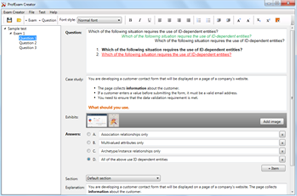
Files with VCEX extension can be opened by ProfExam Simulator.
Discount: 20%

Demo Questions
Question 1
A developer is creating an automation project which creates a temporary password in the company’s system for new employees. To protect this sensitive information from being logged during the execution of the automation at the Verbose level, how can the developer avoid logging any variable and argument values in both Orchestrator and Studio?
- Store all sensitive information in an Excel file that the process can access.
- Check the Isolated property when invoking a workflow with sensitive information.
- Ensure all personal information variables are of the SecureString variable type.
- Check the Private property on the activities that reference the variables or arguments.
Correct answer: D
Question 2
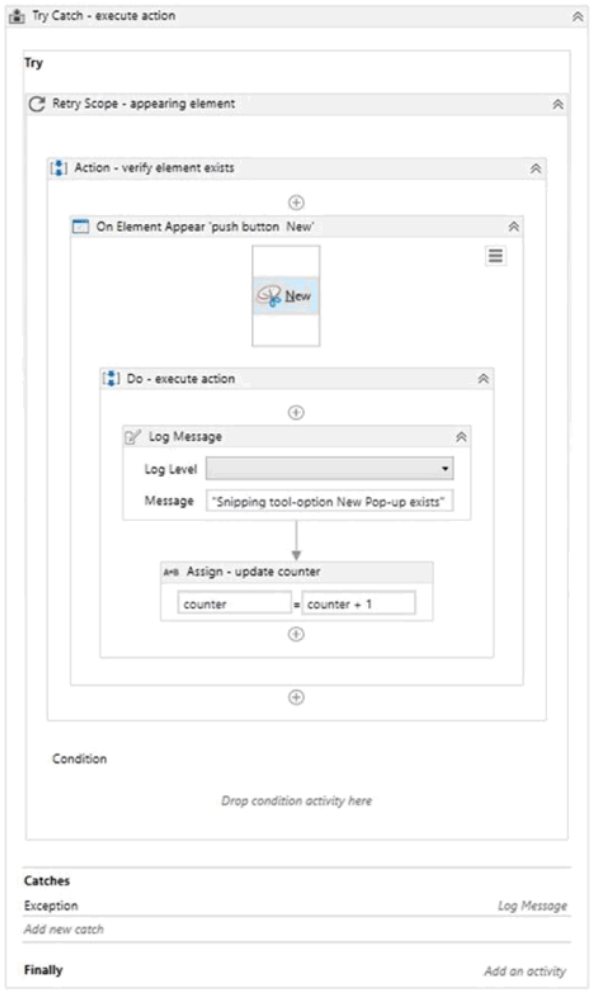
A developer created the following sequence:
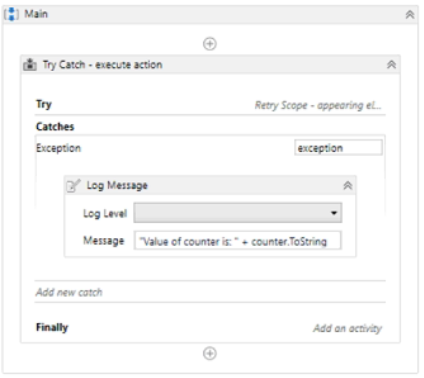
The following reflects the Catches block for the Try Catch activity:
The Variable tab appears below:

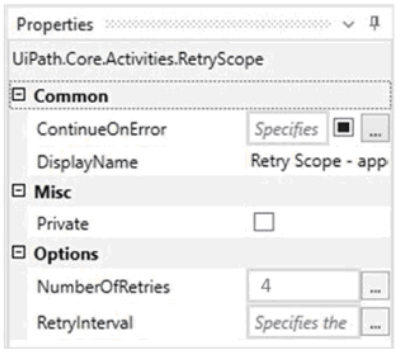
The Properties for the Retry Scope activity are shown below:
The Properties for the On Element Appear activity are as follows:
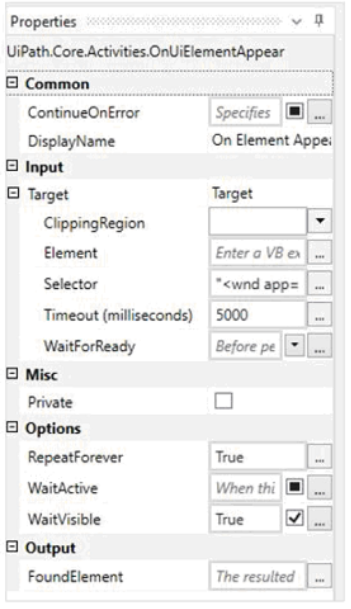
Based on the configurations shown in the exhibits, which output is displayed in the Output panel when the target exists at runtime and it is not visible on the screen?
- Snipping tool-option New Pop-up existsSnipping tool-option New Pop-up existsSnipping tool-option New Pop-up exists
- Snipping tool-option New Pop-up existsSnipping tool-option New Pop-up existsSnipping tool-option New Pop-up existsValue of counter is: 1
- Value of counter is: 4
- Snipping tool-option New Pop-up existsSnipping tool-option New Pop-up existsSnipping tool-option New Pop-up existsValue of counter is: 4
Correct answer: C
Question 3
A process was developed in the Robotic Enterprise (RE) Framework using an Orchestrator queue. The Max # of retries for the queue is set to 1 and the queue has 30 new transaction items. At runtime, the first Transaction Item throws a System Exception.
How does the process proceed?
- Transaction is not retried and the process stops
- Transaction is not retried but remaining transactions continue processing
- Transaction is retried multiple times until processed successfully
- Transaction is retried only one time
Correct answer: B
Question 4
A developer changed the Run value and Debug value of the Browser property to Chrome in the UI Automation section of the Activity Project Settings menu. Which activities will be affected by this change?
- Only Attach Browser activities with the default BrowserType property
- All Attach Browser activities in the project
- Navigate To and Close Tab activities
- Only Attach Browser activities with the BrowserType property set on IE
Correct answer: B
Question 5
A developer is working on an automation in the Robotic Enterprise (RE) Framework. Each transaction item represents customer data. The automated process must click on the "Generate Shipment Details" button for each customer. Ideally, this generates a table of shipping records per customer.
If the generated table displays only the header row and no data is available for the current customer, then it should be marked as an exception since the data is not available and processing for that customer should stop. What is this type of exception?
- System Exception
- ApplicationException
- BusinessRuleException
- NullReferenceException
Correct answer: C
Question 6
A developer created a sequence with a Retry Scope shown in the following exhibit:
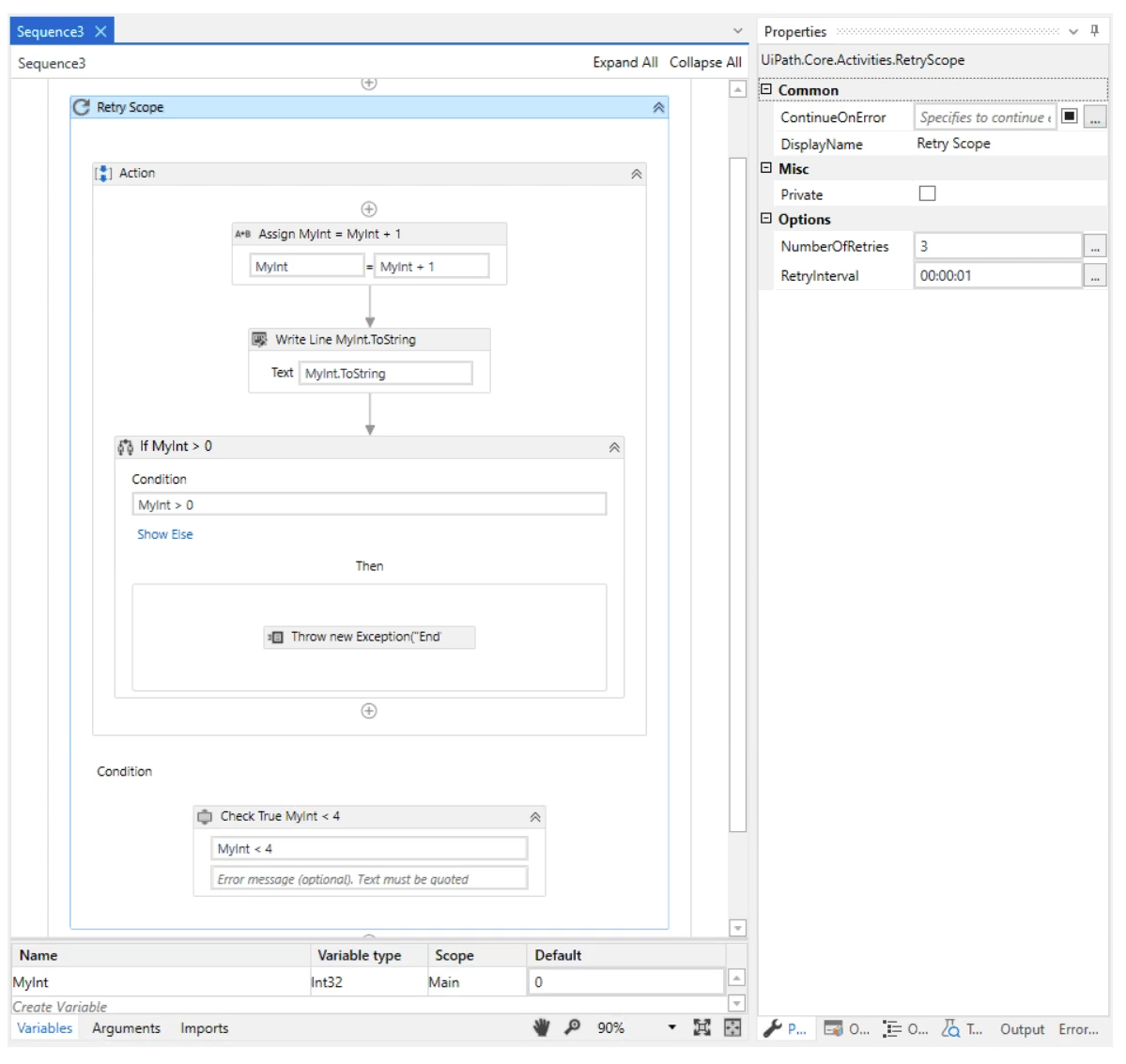
What is the content of the Output panel after running this sequence?
- 1
- 12
- 123
- 123Retry Scope: End
Correct answer: A
Question 7
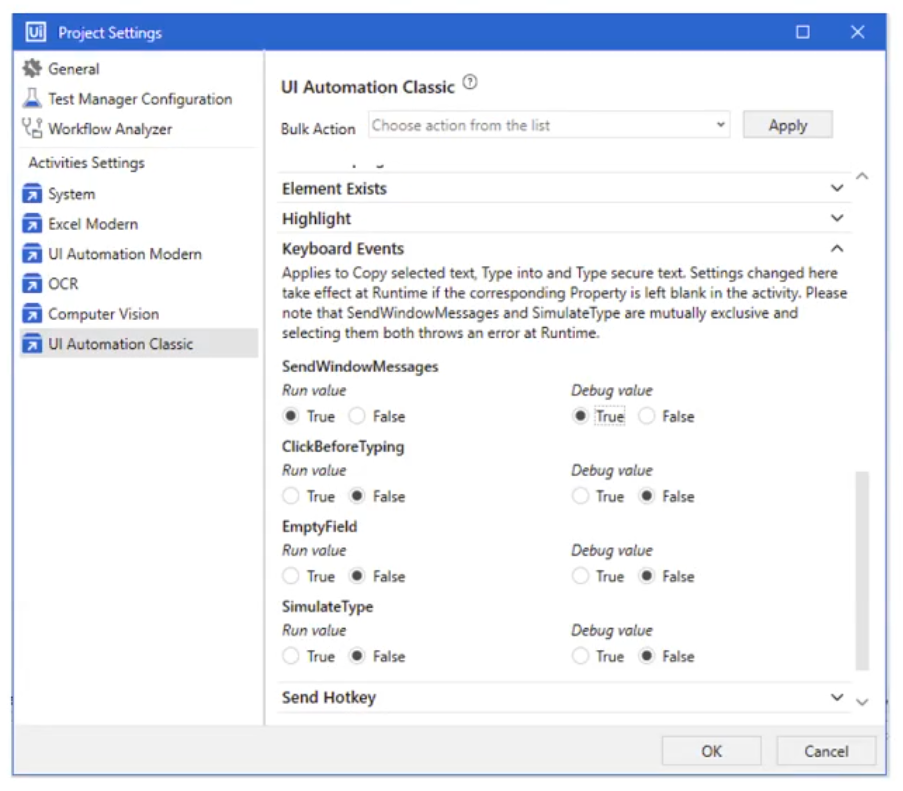
A developer is building an automation which types text into the fields of a web page. The Activity Project Settings for UI Automation Classic activities are set as follows:
The developer has configured the properties of a Type Into activity as follows:
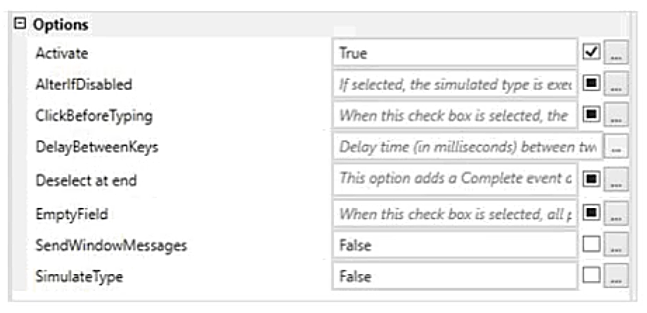
What is the behavior of the Type Into activity when executing the workflow?
- The activity will use SendWindowMessages in Run mode and in Debug mode.
- The activity will use Default in Run mode and SendWindowMessages in Debug mode.
- The activity will use Default in Run mode and in Debug mode.
- The activity will use SendWindowMessages in Run mode and Default in Debug Mode.
Correct answer: D
Question 8
A developer created the following sequence:
The following reflects the Catches block for the Try Catch activity:
The Properties for the Retry Scope activity are shown below:
The Properties for the On Element Appear activity are as follows:
Based on the configurations shown in the exhibits, which output is displayed in the Output panel when the target exists at runtime and is visible on the screen?
- Snipping tool-option New Pop-up existsSnipping tool-option New Pop-up existsSnipping tool-option New Pop-up exists
- Snipping tool-option New Pop-up existsSnipping tool-option New Pop-up existsSnipping tool-option New Pop-up existsValue of counter is: 1
- Value of counter is: 4
- Snipping tool-option New Pop-up existsSnipping tool-option New Pop-up existsSnipping tool-option New Pop-up existsValue of counter is: 4
Correct answer: D
Question 9
Review the following exhibit:
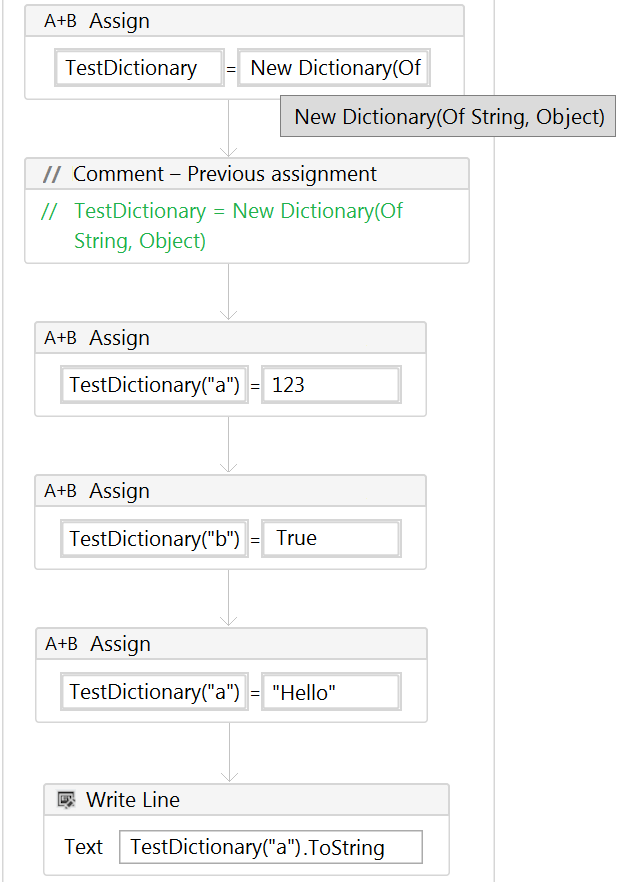
Based on the exhibit, what is the result of the Write Line in the sequence?
- 123
- 123True
- Hello
- True
Correct answer: C
Question 10
At a minimum, what are the recommended properties a developer should configure to use the Get IMAP Mail Messages activity?
- MailFolder, Port, Server, Email, and Output Messages
- MailFolder, Port, Server, Email, Password or SecurePassword, and Output Messages
- To, Subject, Body, Port, Server, Email, Password or SecurePassword, and Name
- Account, MailFolder, and Output Messages
Correct answer: B
Question 11
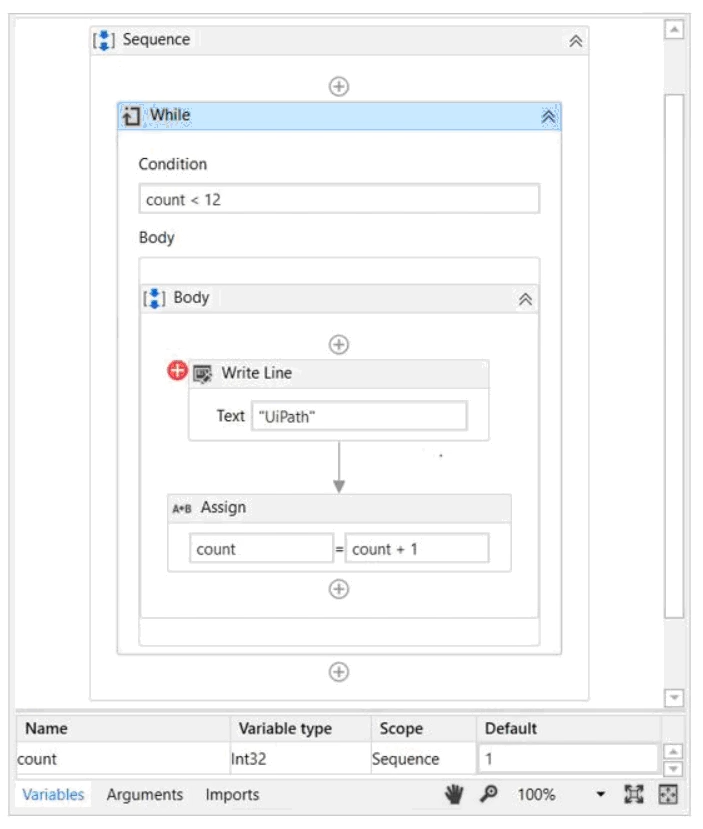
A developer applied a conditional breakpoint to the Write Line activity inside the following While loop:
The Breakpoint Settings panel is shown as follows:
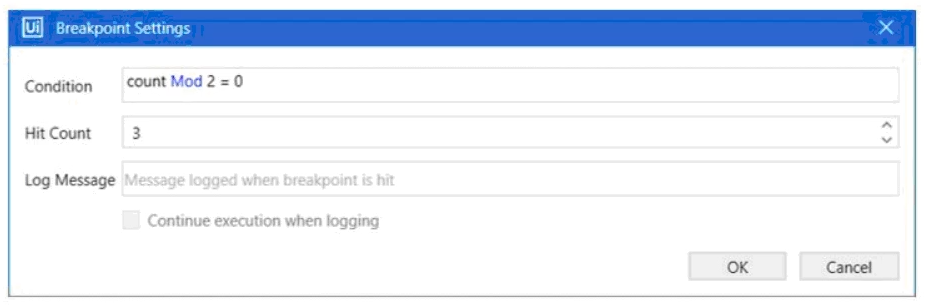
How many times will "UiPath" be displayed in the Output panel before the process goes into a Paused state in Debug mode?
- 2
- 3
- 4
- 5
Correct answer: D
HOW TO OPEN VCE FILES
Use VCE Exam Simulator to open VCE files
HOW TO OPEN VCEX AND EXAM FILES
Use ProfExam Simulator to open VCEX and EXAM files
ProfExam at a 20% markdown
You have the opportunity to purchase ProfExam at a 20% reduced price
Get Now!